Category: Blog

  • Email Ninja-ing

    Email is all the rage – both Fred Wilson and Brad Feld wrote about the necessity to properly use email as a re-call to action for web service users. I agree, since your email inbox is what your work life often revolves around (yes, this sounds sad). If you have someone’s email address, and you can write a halfway personal text, you’re bound to get a response.

    The downside of all the services we are now using is the incredible surge in email volume. Whenever I catch a glance at someone’s inbox and see it overflowing with GroupOn emails and Facebook message alerts, I cringe. Some people wear an overloaded inbox as a badge of honour, but it’s really not practical. So, here’s my short list of how to make email bearable when dealing with craptons of emails (like I unfortunately do).

    First – three facts:

    Inbox “0”…

    …is a nice concept, but not the holy grail. If you try to get that number down to zero and nothing else, you are haunted by a special case of ODD – and it will not make you more productive at all.

    Email as todo list…

    … is a terrible concept, but unfortunately a fact of (working) life. If you have a boss, investors, or a coworkers, they will give you stuff to do via email. As they also wait for an answer, your inbox essentially becomes your to do list, and sending a reply ticks a task off the list.

    Rules and training…

    …are necessary to make this work. My system won’t work for you, probably, but at least it contains some nifty ideas on how to avoid overload.

    Three easy steps to eliminate crap from the inbox

    Separate addresses for ham/spam

    Use a separate email address to sign up for stuff like web services, newsletters, and non-essential things. This is the blanket solution to keep annoying stuff out of your inbox.

    • Get a short, anonymous, easy to remember (and spell) gMail address. *
    • Change all your web services to send to that address (takes forever but is worth it – I got mine about 6 years ago, and am now exclusively using that to sign up to stuff).
    • Set it up as a subfolder in your main gMail account (you use gMail, right? You better). Set it up via IMAP so you can also send and reply from within your main account using that address.
    • Make a filter in gMail to skip your inbox and apply a label that you set up in your sidebar.
    • If you get tons of emails from services like Twitter/FB, consider setting them up to be marked as read automatically. You will still see them when you glance through the label folder.

    Bam. You probably just eliminated 50% of your inbox volume. Rinse and repeat.

    Archive religiously

    Archiving will not delete your mails, instead you keep everything in “All Mail”.

    • Add the “archive” button in gMail and use it for everything you get done. Keeps the original inbox light.
    • Use the “send and archive” button (in gMail labs) to skip an extra click. Use keyboard shortcuts for bonus points (“e” archives current, “[” archives and goes to next, “]” to previous email).
    • To archive your current inbox (you kinda have to), go to the last page of emails, ‘select all’, and gMail will ask yuo if you want to select your whole inbox. Do it, and ‘archive’. Your first whiff of inbox zero. Then go and ‘move to inbox’ whatever you still need to work on.

    Set up filters and tags

    The extra email address is the first filter, but you can get many more working for you. Especially if you are on a few mailing lists you don’t want to miss. I found it worthwhile to use filters and tags:

    • Group / task / job (admin, expenses, travel) – filter to apply tags and color code them. I.e. an automatic expense tag (using a +expenses@ address, see below) is very convenient so i know what to print when i do expenses once a month.
    • In private, use it to set up your different personas – for companies you deal with, your projects, and maybe groups of people you mail to. Makes it much easier to find stuff.
    • Make sure to clean up tags once in a while so they don’t clutter your sidebar.

    That’s all you need – you won’t miss stuff and you will be much more efficient in finding things. Priority Inbox does some of it automatically, but setting it up custom made lets you tailor what you want to see or not much more easily.

    I usually end up with about 3-5 emails in my inbox at the end of the day, and have a pretty good email response time. You?

    * An alternative to a separate email address is a Yourname+Something@gmail setup. gMail allows you to set unlimited +anythingyoulike and will deliver them straight to your inbox. It works, but is much more filtering and still gives out your real email address.
  • No longer “hide apps” in facebook?

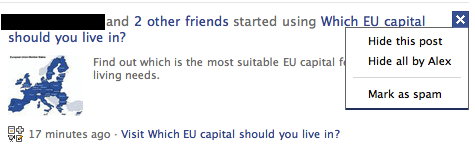
    It seems that you can no longer hide apps in the facebook newsfeed (as in “hide all posts from this app”):

    Apps Screenshot

    Can’t say I’m a big fan of this. FB will argue they prune the newsfeed anyways (you only see about 2% of all posts from friends), but it’s a pretty obvious move towards pushing more apps and ads. Clicking “spam” will probably  influence this, but you do not have full control over it.

  • Tech support lifehacks

    I worked for Mercedes Benz’ excellent customer service program during my undergrad. It was a fun job with great colleagues and I learned a lot from it. I derive massive lifehack value from these times until today, because it is actually quite easy to make customer service work for you (not the people, but the institution of it). Here’s how:

    1. Always be nice. This is the most important step – never get ugly with the rep you are talking to, he is the only one who can help you at the moment. Not only do I owe this to my colleagues – it also really works. When you are on the phone or email for all day, you can really determine if someone was ripped off or hurt or if he’s just trying to make a buck off you.
    2. Tell your story. If you have a genuine problem, explain it nicely and quickly and try to find a solution with the customer service representative. Don’t rant and ramble, just tell what happened and explain why it’s bad.
    3. Try to find out what works and what doesn’t before you call. This is important to get through the loops – if you know some of the goodwill solutions (they are usually policies, especially if you are dealing with a large corporation, your case is not the only one), it is easier. Suggest them to your rep and be open about knowing them.
    4. Be reasonable. If you are a halfway decent person, you know what flies and what doesn’t. If your problem is real, you should be helped, if you are trying to replace your one year old TV for the next model because you are pissed there’s a new one – get out. Seriously, it is easy to get hung up on these things, and you will make more than one persons’ day miserable if you do.
    5. If being treated rude, escalate. Take it to the higher ups, because people should be helping you. If you are nice in turn, you can also quickly get a grumpy rep to sympathise with you, so always try the nice route first – it’s quicker, less troublesome and decent to do.
    6. Never threaten. Don’t say “I’m such and such – you will hear from my lawyer/popular friends/blog/etc.” – you will get people working against you, because you are clearly trying an “unfair advantage” they feel is unnecessary. Always remember, customer service is an absolute people’s game.
    7. If you aren’t heard and you should be (of course – this is everybody) – just write a letter to the CEO. Yes, a real letter helps, and there is often a separate CSR team for letters being sent to the CEO – they have special budgets, shortcuts, and superpowers. If you treat them badly, however, you will land on the sh#tlist forever, so don’t push it.

    These are all very normal suggestions, but they usually get you somewhere. If not, be creative and try alternative rules:

    • Try new outlets and routes. When I had a (really stupid) problem with T-Mobile UK, i tweeted about it and got a response within a couple of minutes. After a bunch of unmotivated call center dudes that spoke in unintelligible accents (everything from indian to welsh and scottish), I received a pleasant phone call. It didn’t help my problem, but it was better than before. These special routes (and Twitter is usually a special route for companies) are less crowded and new – so the people working on them do their best.
    • Play with their system. Today, i received the following message after buying a boxed (!) version of a popular office program: “A number of non-functioning product keys were released to manufacturing”. No further information, no contact number, nothing (for UK or Germany). So, I called the free US number via skype and got my new product keys in no time – the rep was really sympathetic and wanted to help me. He knew I cheated the system, but he also knew that his company had screwed up, so we were both ok.

    The essence is that the CSRs usually know your situation and understand your frustration. They are being screamed at by hysterical people for a better part of the day, so having someone decent to talk to is usually already a welcome change. Be nice and get help.

    Oh, also use those gethuman numbers – they really reduce frustration. If stuck with a robot, just hit zero a couple of times, always works.

  • There is currently no service due to lack of tubes.

    Actually, series of tubes. The internets will make an appearance in our place soon, which is when there will be more life in this.

    I’ve been busy at work, moving in, getting set up, meeting people – London is giving me an incredible welcome, I am very happy here. You’ve got to love it.

    You’ve Got to Love London from Alex Silver on Vimeo. HT/Roitsch

  • Recommended Facebook Privacy Settings

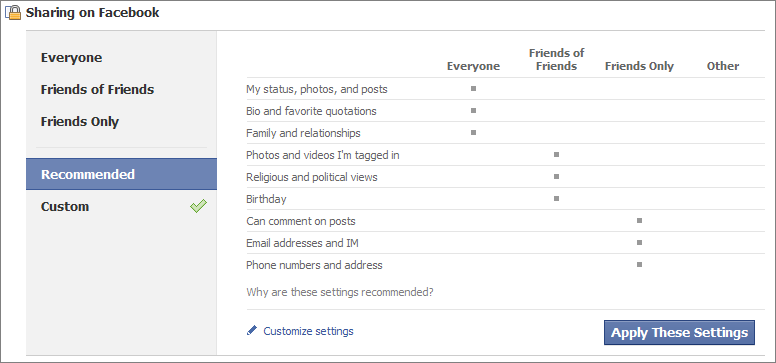
    So, this is the new “recommended” pricavy setting in Facebook. Not sure if I agree with all this – especially “photos” should be private/friends only, I think.

    The recommended privacy settings in Facebook
  • Leaving Cologne, off to London!

    Yes, that’s right. I quit my Job at DuMont Venture and I am moving to London in only six weeks. I will join Seedcamp* as their new associate come mid-June to strengthen the European startup ecosystem and to bank on my own passion and experience in dealing with early stage companies and founders.

    The decision to leave DuMont Venture, my colleagues, friends, and our portfolio, was not easy. I have experienced and learned more than I could ever have imagined when Jörg first asked me to join him and Olaf in starting DuMont Venture back in 2007.  Joining any company in its startup phase is intense and exciting, and setting up a venture firm is no different. We always referred to our own “startup” because we had the same growing pains as any other small organization. Nevertheless, I think it is safe to say that DuMont Venture is by now established as one of the main players in “earlier” stage VC in Germany. I am incredibly proud to be part of this success and it is very hard to move on – both the team and our portfolio was made up of awesome people that made work a pleasure every single day. Really – Every. Single. Day.

    I first got in contact with Saul (the founder of Seedcamp) in November 2009, in response to a post on the evolution of Seedcamp. There is a big debate out there on the changing model of venture capital and the emergence of smaller and more hands-on oriented funds. Techstars and ycombinator are the most obvious candidates, but many other geographics see similar models deploying smaller amounts of capital in connection with a really active mentoring and support program. Meeting hundreds of entrepreneurs in the last years has taught me one thing especially: There are many questions and not so many answers out there – on all topics and areas of entrepreneurship, funding, and scaling of companies. Smaller funds investing knowledge and advice can add incredible value to a team of smart young entrepreneurs with a big idea. The use of “smart money” is in my opinion most appropriate in this early stage of a company’s life, as all other aspects are leveraged manyfold. This is the reason I am a strong proponent of this kind of model – and this is also the reason I felt I needed to walk the walk instead of just talking about it.

    So, I am already in the process of preparing my move to London, handing over my responsibilities at DuMont Venture, and stopping my head from spinning too fast. I am in close contact with the team at Seedcamp, and Reshma and Alasdair are doing everything to give me warm welcome. One thing is for sure: I am excited beyond belief.

    If any of you guys know someone moving out of a cheap and spacious appartment in the city of London (yeah, I know…), please let me know. In the meantime, Startups, please apply to Mini Seedcamp Berlin on the 16th of June (my first day at Seedcamp!), read about Seedcamp and spread the word about it – because it is awesome.

    On another note, my posts will obviously be in English from now on (except when I complain about London property prices).

    *About Seedcamp from the Seedcamp Website:

    Seedcamp is a programme created to jumpstart the entrepreneurial community in Europe by connecting next generation developers and entrepreneurs with over 400 mentors from a top-tier network of company builders; including seed investors, serial entrepreneurs, product experts, HR and PR specialists, marketers, lawyers, recruiters, journalists and venture capitalists.

    Seedcamp acts as a micro seed fund to invest in startup companies, mainly through our flagship event Seedcamp Week which takes place in September every year. To make sure we are honing in on all the new startup talent, we also run Mini Seedcamp programmes throughout several startup hubs around Europe from January-June. Seedcamp’s standard investment is €30-50k. Following Seedcamp Week, the companies who receive investment stay in London for 3 months to grow and develop their company, building key and lasting business relationships along the way to help them sustain a viable business.

  • New Design again

    I think this is more appropriate. Everybody loves Kittens.